
Quick Minecraft: Fast Access to Gaming Sites
Overview
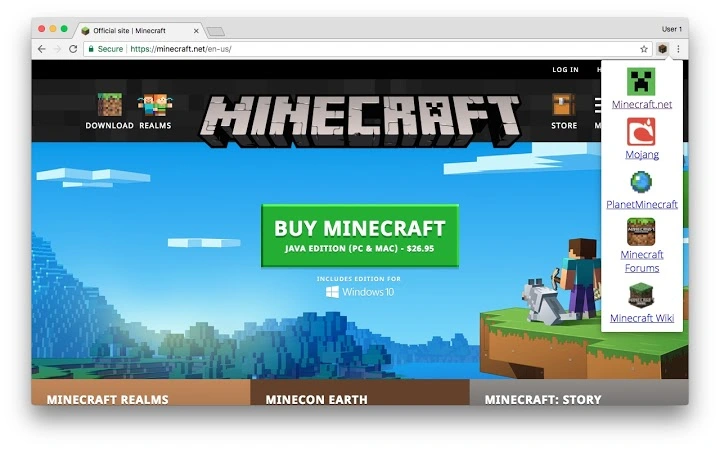
Quick Minecraft is a lightweight browser extension designed to streamline access to commonly used Minecraft-related websites. Built for gamers and Minecraft enthusiasts, it eliminates the need to manually search for favorite sites by providing a single-click gateway through a crafting table icon in the Google Chrome browser. The tool is particularly useful for players who frequently visit resource hubs, server lists, texture packs, or community forums.
As a browser-based utility, it operates entirely within Chrome, requiring no installation beyond the standard extension setup. Its primary purpose is convenience—reducing time spent navigating between multiple tabs or bookmarks. The extension is especially beneficial for users who manage multiple Minecraft projects or participate in active online communities.
Developed by QuickMinecraft, the extension is available at no cost, making it accessible to a broad audience. It is compatible with both Windows and Mac operating systems, supporting Chrome users across desktop platforms. The developer did not provide additional details about the team or development background.
Key Features & Capabilities
- One-Click Access – Launch commonly used Minecraft websites with a single click on the crafting table icon in the Chrome toolbar.
- Minimalist Design – The interface is unobtrusive, focusing solely on functionality without clutter.
- Chrome Integration – Fully integrated into Google Chrome, ensuring seamless operation within the browser environment.
- Fast Loading – Designed to load quickly, minimizing wait times when accessing linked sites.
- Free to Use – No cost or subscription required; all features are available immediately upon installation.
Users can benefit from this tool when managing multiple Minecraft-related tasks, such as checking server statuses, downloading mods, or browsing community content. The extension helps maintain workflow efficiency by centralizing access points. It is ideal for both casual players and those involved in content creation or server management.
User Interface, Workflow & Performance
The user interface is simple and functional, centered around a single crafting table icon located in the Chrome toolbar. Clicking this icon reveals a dropdown menu with links to pre-configured Minecraft-related websites. The layout is clean, with no unnecessary animations or visual distractions.
Navigating through the extension is intuitive. The workflow is consistent across sessions—install the extension, click the icon, select a site, and redirect occurs instantly. No configuration is required, making it suitable for users of all technical skill levels.
Performance observations are based on general software behavior patterns. The extension is lightweight, with a file size of 1.2 MB, suggesting minimal impact on browser performance. The developer did not specify resource usage details. Stability appears reliable, as the tool operates without requiring frequent updates or troubleshooting.
Compatibility & System Requirements
Quick Minecraft is compatible with Windows and Mac operating systems. It is designed specifically for Google Chrome, meaning it will only function within this browser environment. The extension version is 1.0.1, with a file size of 1.2 MB.
Exact system requirements were not listed. Platform compatibility information is limited to the operating systems and browser specified. Users should ensure their Chrome browser is up to date to maintain compatibility. No hardware-specific requirements were provided.
Pros and Cons
Pros
- Free to download and use with no hidden costs
- Lightweight with minimal file size (1.2 MB)
- Simple, intuitive interface with one-click access
- Works seamlessly within Google Chrome on Windows and Mac
- No configuration needed—ready to use immediately
Cons
- Only available for Google Chrome, limiting cross-browser use
- No customization options for added links or site management
- Developer did not provide detailed documentation or support channels
- Functionality is limited to pre-defined websites with no user-defined additions
- Not available for other browsers or desktop platforms outside Chrome
FAQ Section
Is Quick Minecraft free to use?
Yes, Quick Minecraft is completely free. There are no subscription fees or in-app purchases required to access its features.
Which browsers are supported?
Quick Minecraft is designed for Google Chrome only. It is not compatible with other browsers such as Firefox, Edge, or Safari.
Does the extension require an internet connection?
Yes, an active internet connection is required to access the websites linked through the extension.
Can I add my own websites to the extension?
No, the extension currently does not allow users to add or modify the list of included websites. The links are pre-configured by the developer.
How often is the extension updated?
The extension version is 1.0.1. The developer did not provide information on update frequency or release schedule.
Final Thoughts
Quick Minecraft delivers on its core promise: fast, reliable access to popular Minecraft-related websites. Its minimal design and one-click functionality make it a practical tool for gamers who value time efficiency. While it lacks customization and cross-browser support, its simplicity and zero cost make it a solid choice for Chrome users.
For Minecraft enthusiasts seeking a streamlined way to navigate online resources, this extension offers a clean, no-frills solution. It fits well into a daily gaming routine without adding complexity.
Download Quick Minecraft now







